Digitalizing your company’s holiday management
Kenjo is the All-in-one platform to manage, communicate, and develop your frontline employees
- Product
- Kenjo
- Sent from
- kenjo.io
- Sent
No dark-mode styles — this email renders the same in a dark client.
Kenjo is the All-in-one platform to manage, communicate, and develop your frontline employees

Hi Emre,

We hope that your set-up is coming along well, and you are discovering the value of Kenjo during your free 14-day full access trial.

In this email, we’d like to introduce you to setting up your company’s time off configuration. Once you set this up, employees will be able to request time off and managers will be able to process the requests, all within the Kenjo app (both mobile and desktop).

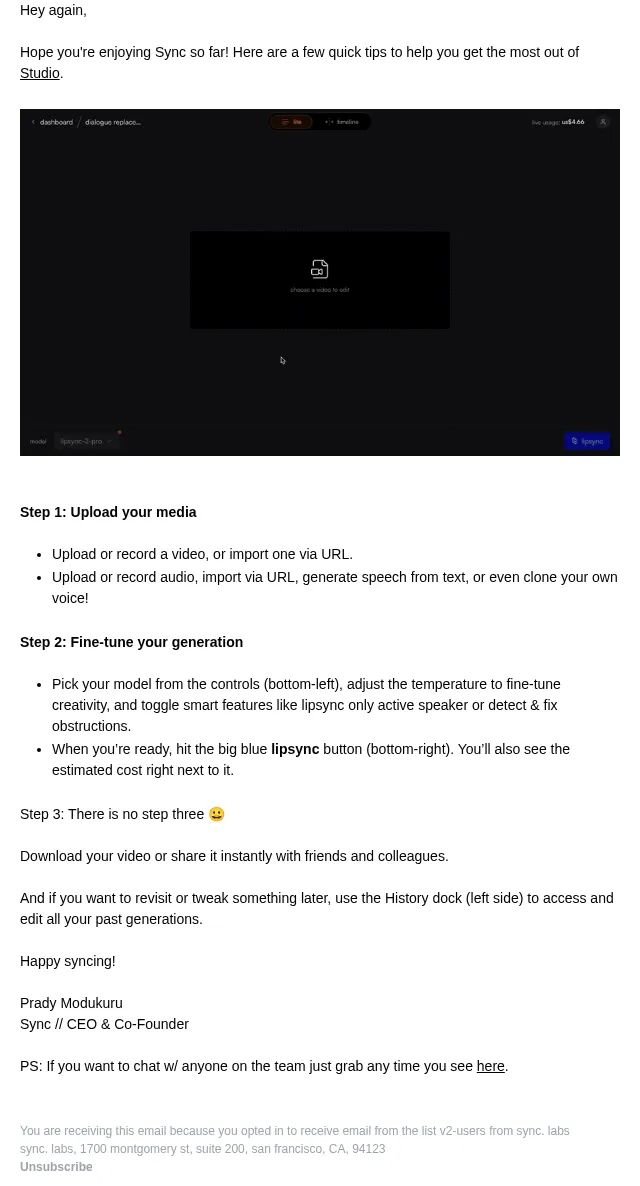
Time off management can be setup in 3 steps:

Step 1: Create a Time-off type

Step 2: Create Time-off policies

Step 3: Assign the policies to your employees

Create a Time off type

Time off types define different types of absences, such as sickness, vacation and parental leave, that your employees can request.

To create a time off type, from the settings menu under Time off click on SETTINGS.

Under TIME OFF TYPE, you’ll see three default types for Sickness, Holidays and Home office.

You may select one of these or set up a new Time off type by:

- clicking on the “+” icon, adding a name, and setting policies.
- A detailed Help Center article Create Time off types  (https://mail.kenjo.io/e3t/Ctc/DJ+113/clpmB04/VVtQpr173BDrW2N3Dph8TdF6RW1MKd8X5TYnqgN3hBC5M5m_5PW69t95C6lZ3pcW3b4Rwx8gjPg7W1S4hrd4GtxnbW8dhXtz91PD2kW2nG-jD5fFQqsW78JXGz8GntM9W4q1yq27DSNfmW7Hc_bh4Crc6bW1sqgHF1Hm0BGW5pHVkn4gK73RW2TlgR31wfMQ1W3CNVWF9jSBsfW4lY-B-5LQdrFVMR7jk25pMCDW5-JXB66jGshkW8yK8sh2cD1TwW5H13jK43vfrFW7hpWyH73vfkgW8CzJbL1r3LbGW8wPVXh3KltVpW9gH4jv2sTV9tW5bPM1x5_S0TMW8X57165_3jVgW8phkjv1402QCVTsmGg1bCB7TW82mSSk1s-tZFW3MyLsy39Vk1lW3j8mNq8SzYs5VLxRpv5WS4rXW5WJX6h6JcJ60W6BVpN78MP0HjN1j2D4HkJWS9N4K_LMpNGxNlVMJ1Gh6sZgp1W1CQLkX8cdlzLW9ghXWD7c39qJW2gvFRR2hcl8Df7J02yP04 ) is also available for you.

Creating time off policies

Here you decide the rules under which each time-off type operates, specifying the cycle, allowance type, and number of days/hours along with many other advanced options. You can create several Time off policies under one Time off type.

To add a new policy, you need to select the time off type you wish to edit and click on the icon (+) ADD NEW POLICY.

Afterward, you can name the new policy and set up all the policy’s rules, beginning with the allowance.

After creating a policy, you will be asked whether you want to assign employees right away to this policy. Click YES, ASSIGN EMPLOYEES.

Select the employees from the list that you want to assign to this policy. You can then select the apply date of the policy and if you want you can also change the starting balance of the policy. For a detailed set-up walk through, you can also visit our Help Center article Create Time off policies (https://mail.kenjo.io/e3t/Ctc/DJ+113/clpmB04/VVtQpr173BDrW2N3Dph8TdF6RW1MKd8X5TYnqgN3hBC5s5m_5PW5BWr2F6lZ3nvW8N1NTX7nY6wzW1-qjWd6cV7kTW63vh0X5R1knXN8BzwKcNM6T1N5Hn7SD3SvGqW53G7R64WZ3LfW6QqBZN4N45bTW3vJd0m5zm6gYW2TMvSP3hD6JLN3ztWkp7r5B0W6gkj5q8XCRJRW1_BpNq7tNf_mW8MHX9877PClhW4kzDsk8SYSgGN7BsPY0HNRy7W3wWw-P4kS6D4W3y1QhW2Wxg7TW4j710V4CxvhMW7m_3JB93bSwmW4nHv3T6Kz3b-VRCg5t6_PZxNW26nQc-4xjhrpW6GXjnz3PWQ3DW4qLNnx7s7dVdW8346ZY2kTh-4W6bBK_-8cwrwlN8dxdQXKP35kW21L3828mWP8YW8bccmt7BXmFqW3dPgS898GspsW5zTBV98KPn9kW1ZXtmH4Dk_2kW6P4B8n6pN3LbVL5VQB20GHbPf96G8wK04 ) .

So once you have completed the above steps, you can inform your team of the changes. They can already begin requesting time off via Kenjo from their dashboard. You and any other manager can approve or reject those time off requests from the Requests tab on the top menu.

For further detail, you’ll find a step-by-step guideline on Time off types and policies in Kenjo’s Knowledge Base (https://mail.kenjo.io/e3t/Ctc/DJ+113/clpmB04/VVtQpr173BDrW2N3Dph8TdF6RW1MKd8X5TYnqgN3hBC6l5m_5PW7lCGcx6lZ3m1W6K3P4M7lxQ3dN72djn28xfJFW1ml75c6_ZMSVW4D1jYp6wLFDvW4sxXWd300JJ0W3tqPRt7bHHq6W3v9MSK8BS8L0N8QcK2VNGJV5W3G569C56tzMWW8BG_Z792Yf1pW4pbMf88dVkzQW75t54M1_RRh1N3h-YrkDBG-4W5Pk0Xt42LPY5W6-ll5z6XvVCSW8Ljmlb4Q4m2VW9gWs9h8LpyTPVYGFBs6HqL-VW72--4-86gzD3W8WkKpy1Z1hMWW8rMl1P1vFwy3W7shJPt9jk3VcW8f7sPw8VWxQSW1HQ_9t8JCt0DW51k9B-64dhSxW6CLJXf3vXpYsW890KSN1m7v8gW97_1GW2NGV5wW9jK-sc1tNm86W4nvD2b7nqM3WW8bndVc4qd-0wVXpQMz1WF-s1W8wlXt55MX_9JVgvr9s6fYWhfW5pLqcj6gB6YMW13S_rR8ptm1yW6KT9r22Gw9PzW5NX2Zg91-DTTW8wZpPM6_2W4FW28th0P9kYGSQf4l3l5204 ) .

Did you have any questions or need assistance setting up your account? Our Accounts team is here to help.

kenjo book a demo cta email (https://mail.kenjo.io/e3t/Ctc/DJ+113/clpmB04/VVtQpr173BDrW2N3Dph8TdF6RW1MKd8X5TYnqgN3hBC5s7S8_gW5BWSxg6lZ3pDW8vSwWm85gzZ-N7W-GmCsF3PdW8jhKVP7FLRT4Vc1K2B8MH_H5W3STn7R90vqSyW3RSMv31C0ys6W8v7nCp5XC04dW5LYJB63-2xJ0W6wZjl_4zQPnZW8kC6587q597ZVDQTSw1ymd5DW1zZzzd6VWTfgW6p0sLN35mlv6W19_fDK3BqypWW3-NQvV93fpdtN8jRv4gMjgt1N6ZRYKC83mjPW1f9STv9hc7FnW5vj4rw5FCSRmVcGGFw2ZQpP8W2hvv2t7mXnJXVyMWf75QWjlDW75s_cD3l4zB8W3Vvx3J7QsYLMW6rpV6-3HnFhFW42H_kP6kNlnMW3RZTg18Tr0wMW7hpLS-4Ty2TMW7BK0kq5Rt6JVW6fWSQw58JYP-W3BPgr14xt95xW2bZLyw7RwRpyW1g45vh93Z9sqW6xvrh168wmLfT_qDw3nflcXW41vwlS4x2KDvW7wcsDn17DxMZVkgG1q6y55YyVljn5P1cRsk_W545hlz3Pq88BW8BRjc87ggSmKMqfC13g-Kh2W8rh1WG9fH-jnW5BRDQ9919C0HW1jLjrd2jxbXtW1d73rX4rlRVZV7WZFs2JnP6NW2Svkdj2d3GDqLGpNKPr85kW3tRJXD2_hbjNdV7QSz04 )

As for the next step, you’ll receive a follow-up email that will help you configure your company’s time off setup.

Best regards

Your Kenjo team


Kenjo LinkedIn (https://mail.kenjo.io/e3t/Ctc/DJ+113/clpmB04/VVtQpr173BDrW2N3Dph8TdF6RW1MKd8X5TYnqgN3hBC6Y3prCCW8wLKSR6lZ3pVW6ntlW-3nFMmjW1Qq2rl7Q7n7_W90-_X27qyzJ1W9hYSMc3k3YkyW5gxrQt4XNlZyN8y1B6vZfRnsW98tTmv2bfV_2W8W0V3f32dczyW93QMf56Qn9P3W5tHwFM7mp9GpW3FjYZR3H22-yN7smBf1vn2d_N2hTc17kjLbFW3gnVgS7vvjqXVh7xlX2DjKPRW79s63P3fMnZ8W6RzZzk3SYr7fW760M4S2nSKN4W70kNcR2XCJqxVYDDWs1tR8X6W6sDt726PwTDgW6DcdX27wBB3TW6WSbv41XLGYPW82FzBF3RGS6ZW7LkJk612rggBN5lp47XTc7MFW3ycz4v10LllzN47wDHc2BqF-f1TrVn404 )

Kenjo GmbH, CEO: David Padilla
c/o The Delta Campus, 12043 Berlin,
Berlin

© 2025 Kenjo GmbH.

All rights reserved.

For details about what personal information we collect and why, please see our

Privacy Policy on our website at www.kenjo.io (https://mail.kenjo.io/e3t/Ctc/DJ+113/clpmB04/VVtQpr173BDrW2N3Dph8TdF6RW1MKd8X5TYnqgN3hBC6F3prCCW7Y8-PT6lZ3mTW6pWdMj3tV1r7W5_kzl92sCrMqW63P_p87VLtf4VYFMSb1gF7CFW6dnQ3G7nHFwCW2Z25z-1mFK_PVTzN-65QNrWbW823q4c5v462nW7svMPB8FsHmyN74CBy1lxbYmVdt4NF5QYZjwN2VYKgmd8bQrW5Qz3wY4BMkk9N4wb3Bt7V6dbN5gpbT2sG4PbW1VMwpY5BT6NkW5WYsD56646zLW7xYvTm2DFCtDW3pTtBt5PBcdzW32Qnqg6JJj26W2kTzwY32yq2mW2H7bzG2wg7KtW8jjglL1X0p-vW2_ZRT35yz8j4W6VDzcd3-bZycW8JR6Yt5x1Nfqf4VZ2xs04 ) .

Unsubscribe from our emails

(https://mail.kenjo.io/hs/preferences-center/en/page?data=W2nXS-N30h-GbW1Lj91P3SyWPMW3_Mh_y2Pxx2zW3D-KMw2FLgswW43Nxg130tzV-W43xJjk4pCKqJW3M9p7N45BmmVW30jsGr3dgKFvW2YrtBf3NWGk1W3CgR8G1Qvf8gW3JL4kb4rnR25W3K99_D2t287LW1--zVC1V2vSWW36zl0D4tgpSKW2TNmjW23jnDxW2WJlWr2-svrYW2-KFRp3-1rYZW3HfyGc3QKS6CW4tD0QQ3bdsVhW2vSxN93Xvzx3W238-QK3b9ZJ4W4p8-7g2WcfBjW4hdvRX3Z-ZmkW1V9ZQf2WjyMVW1LpdqV2vSxCfW3NXrQk4cRz6HW3NRWwL2KxpvbW2xyYtV3GM0KWW2HZzYP38DYfZW364BhB3bccQyW3C1Vqp3blhVCW3F6cDy25nrcqW3SB_fV41Dq-fW3VP9qT2YrsxwW3XPpmg3M9Mz1W4mjf9v3XGkhlW367qM84kwb2cW2sQ9N12Wv8xXW41Qt9d2w4SlMW30jP5Y24W6zzW1VtQTH1XvVQFW2vBjlw2CL5gNW3X_fPY3LQq-cW4p7G5G2TQ36mW21gyVk1V7RgvW1Qtpl11N7FFSW1Y_-k91ND2cYW2nNwCP3blMtmW2y0Wxq3gbTcBW2HtQ5v1NkG-NW4hpfr32vzxhRW47s_6G4tx-nvW2r1VBq34fY_QW2CFsKD3j5Dx1W47mVtm1LvFCQW45FGBq2RTCDGW3z8kZN1LqSwQW2-nmCM3D_fmfW2HCRFb2sT3jwW4mH_S61SzDB0W3R3Ydt25m8_gW4ms_dS1Sx0z_W4kLmkn2-kq0f0&_hsenc=p2ANqtz--2zet1qFdjaUWQydPiXPLn5DeijjSDziLbLOXRzY0ZXyonGNf4kp9MMCl8dsiJQrQ5aW3HB7mFqjzG0wwXiDqhmtWKARGpbN9xBghMAt3E9-0pH3q7aT_NWekWYNqpXmo0LkQE&_hsmi=255231214 )
- Accession
- nse/kenjo/2026-09-14/1500
- From
- Marketing Kenjo · marketing@kenjo.io
- Sent
- 14 September 2026 · 17:00 UTC