Trial Next Steps: Improve candidate engagement with your technical assessments
Using pre-written questions in your interviews will reduce the work you have to put into each interview and reduce bias by allowing you to judge each candidate on the same criteria.
- Product
- CoderPad
- Sent from
- coderpad.io
- Sent
No dark-mode styles — this email renders the same in a dark client.
Using pre-written questions in your interviews will reduce the work you have to put into each interview and reduce bias by allowing you to judge each candidate on the same criteria.

Step 1: Create your question

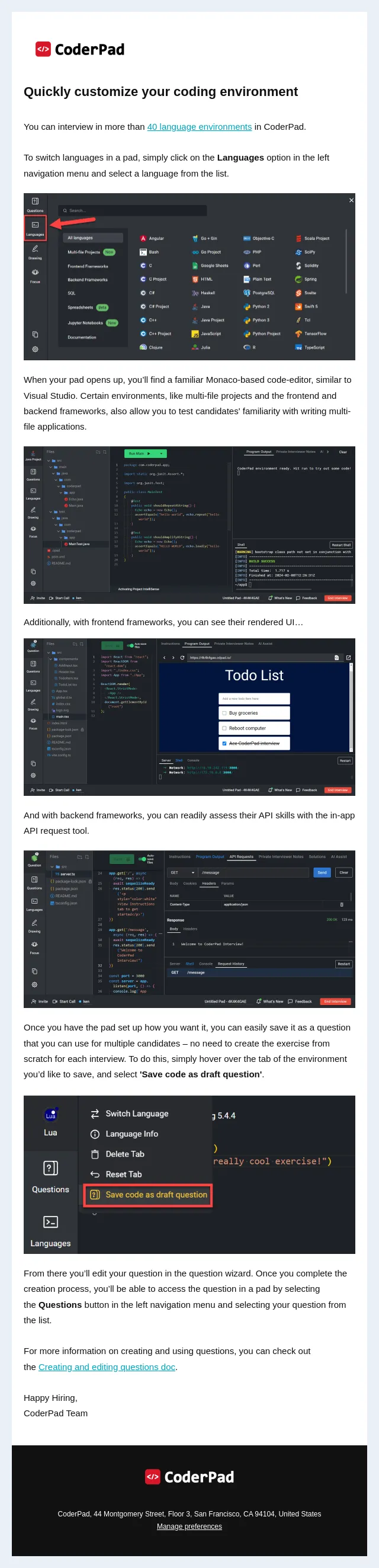
Use the question wizard to select the coding language, write candidate instructions, set up starter code, and customize the question as needed for your purposes. At the end of the question wizard you’ll publish the question so you can use it in your interviews. Create a question (https://d353Nv04.eu1.hubspotlinks.com/Ctc/W4+113/d353Nv04/VWb95Y301ZDNW6Csmv15Xz2PCW6L2xF55VK-CnN8Zqh6T5n4LbW50kH_H6lZ3k_W7KWJr81zg507W8MT2rD8fCZ3zW7G79Vv4XfwXbV8J5Pv87G4CRW3ctRWd9gvyXWW6FBYBC3KYbYMW6_-R0m4G3XJyW6bd4j83hc_0FW58SSNx63vs1KW78bWZJ1BGVXYN2SZ5pJWYFsvMbn7PJ-mZQGW38LHvq6v5TYwW5RnW7513dCSMW8P0x1N2Dq94PW3_sY0V2q_3ScW261wb51rFGp3W6ZqSQx5lh6JzW2Nvr5P1rKFGlW4z_J-F5nRpFSW3PgYww919HzlW5zh45t7bBbGyW23CcRC6WJ4jPW2phHtL7zHbMHW6-5K7H3-jcKfW7RYYTv26QngHN1Vsz3pyYJN7W8Kc5fh4hzqrCW8BkP-H3B3Gw3W3DJ6s46Fs4ylW1Qz6-g3rb0lGW3HhRSg4MZk5Qf4BYrP804 ) .

Step 2: Create a pad from the question for each candidate

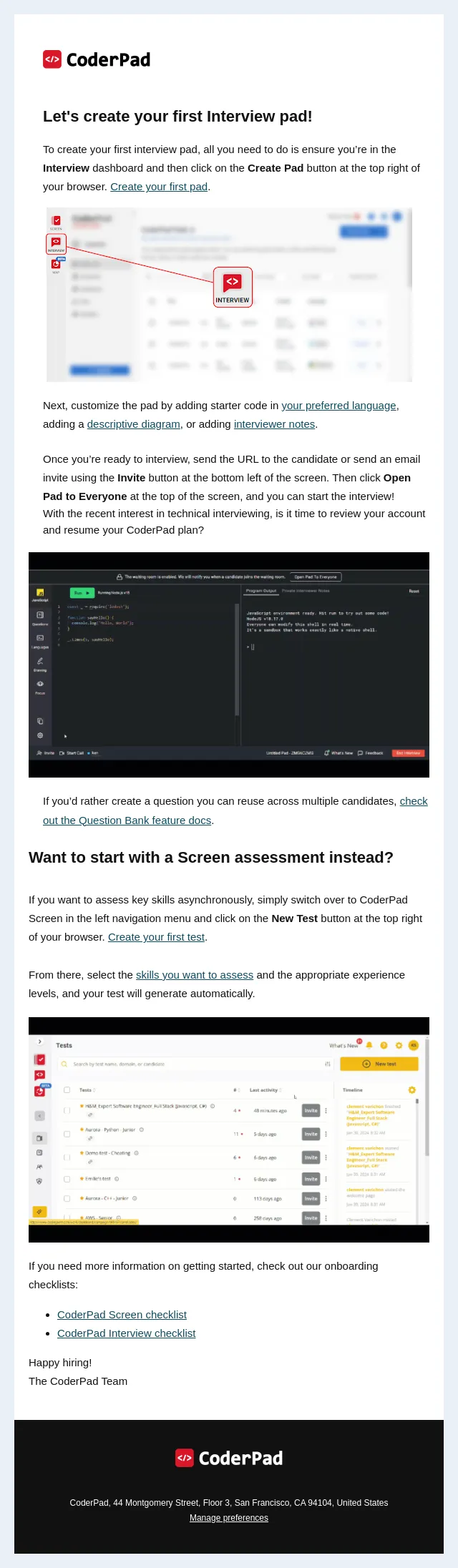
Once your question has been published, you’ll navigate to the Questions dashboard and click Create Pad. In the pad you’ll change the title of the pad; we recommend using the name of the candidate, the role they're interviewing for, and the date.

Step 3: Invite the candidate when you’re ready

In the bottom left of the screen, you’ll find the Invite button. Grab the URL from here and send it to the candidate.

🚦 If you have the waiting room enabled, you’ll have to click either the Open Pad to Everyone or Admit button to allow the candidate to enter the pad.

Once the candidate is in the pad, click on Start Call to initiate video and audio with them to answer any questions they have and work collaboratively with them through the tasks.

Step 4: End the interview and watch playback as needed

Once the interview is complete, make sure you click the End Interview button in the bottom right of the screen. This will ensure the candidate can no longer make changes to the pad, as well as give you access to the interview playback.

You can also add to any private interviewer notes to ensure any follow-up thoughts or questions are documented for future reference.

Step 5: Repeat steps 2-5 for each candidate

No need to set-up a brand new pad from scratch for each interview – just create a pad from the question dashboard, invite the candidate, and conduct the interview.

Create an interview question
(https://d353Nv04.eu1.hubspotlinks.com/Ctc/W4+113/d353Nv04/VWb95Y301ZDNW6Csmv15Xz2PCW6L2xF55VK-CnN8Zqh6T5n4LbW50kH_H6lZ3k_W7KWJr81zg507W8MT2rD8fCZ3zW7G79Vv4XfwXbV8J5Pv87G4CRW3ctRWd9gvyXWW6FBYBC3KYbYMW6_-R0m4G3XJyW6bd4j83hc_0FW58SSNx63vs1KW78bWZJ1BGVXYN2SZ5pJWYFsvMbn7PJ-mZQGW38LHvq6v5TYwW5RnW7513dCSMW8P0x1N2Dq94PW3_sY0V2q_3ScW261wb51rFGp3W6ZqSQx5lh6JzW2Nvr5P1rKFGlW4z_J-F5nRpFSW3PgYww919HzlW5zh45t7bBbGyW23CcRC6WJ4jPW2phHtL7zHbMHW6-5K7H3-jcKfW7RYYTv26QngHN1Vsz3pyYJN7W8Kc5fh4hzqrCW8BkP-H3B3Gw3W3DJ6s46Fs4ylW1Qz6-g3rb0lGW3HhRSg4MZk5Qf4BYrP804 )

Coderpad logo - on black (https://d353Nv04.eu1.hubspotlinks.com/Ctc/W4+113/d353Nv04/VWb95Y301ZDNW6Csmv15Xz2PCW6L2xF55VK-CnN8Zqh8l3pyd0W7Y8-PT6lZ3nzW65YYhT1B4X2QW2HrhBP6gBVqkN7GV0Pc8yx7NW1V9NjL1Yvxm1Tl7DW8K8n6sW6RRxvN37cXnxVJC9kX4mC0qbW5Zc96H2gKNLMW7Tpbqc6B9N71W43Hdk38GCsr-W74kNrh5LXpgCW32Ld2s55w5WmN70qTLQ9GfsRVxypbk8GrJw7W8gdZW94hQFnZW6bRdpQ1RwXJmN3Lt7TMgSNVsW5x2Ddl1rDWzwW8CgSWJ6lXBtnW4Jnx1k41DyXGW8jfGRJ4lHWR1W3Ng2c95ZS5q6W8dTfNy32-CylW6MMwVk5WJ5qSW7MgrVq8dwzYjN6zzqyhNl6g8f2S_bGT04 )

CoderPad, 44 Montgomery Street, Floor 3, San Francisco, CA 94104, United States

Manage preferences (https://hs-26307476.s.hubspotemail-eu1.net/hs/preferences-center/en/page?data=W2nVjwf3Y2w_9W2vC9_X38z9XHW36F5Tt2FLfJgW3QCDGt1LzKftW2-Dhjw3ZWWClW3QKnK32Hq2pyW1VpzsN3LSvXkW1NmP0l43xbs4W4mmtV93M7KFxW3K2yQY3yYHTkW43FylW2q_lWvW2xGHj941LJkjW1X86B_2nQ_prW41Yz2f2sSK4VW2TBqc42WQHY4W2xywcx4cvZf1W2MB-f-2RxbXrW2Ry6C832lJ00W4frSFf4pbCmJW3gs7p32y1d56W45Ws7f2Tz67fW2YPGrr43TDFYW3zcKvy3d1WpDW3Z-bWT1Sf75tW3GYWSg1V8jDXW347Lgt3T3m7rW20Ydmn3DJNkdW1QwSQb1QBd2rW3y__Nn2zxtbpW38wfbm4kc3kdW2Wgxcx2nTtQTW3Fgd0l3gg7s-W49ygQL4tmLtjW1QfMnj20Z3NpW3BNNzX2WFs47W1_jpJL24_7wdW4csYcB3B_nX6W2WjBm73SCTpjW3_Z7FX1_bbf8W3d9MK536vbBhW2xRTBR1-X9XtW2z_rwV3z1HVyW2KY3Q_253jTJW49S6wK1BnNm2W41CblW2TMC1BW43xg342CwnmNW43XSRm3K5tcJW4pHpP42vyd2jW34gQfY1Lhq1TW2qPB1345vr55W45Wv3W3_HbY_W4fK5t_2MTCyJW3N-Lcq32JVh8W1Qk5812RDHkhW1LyWVl3NGjDDW3_MKnV34hZk9W3B-4944cxJ9cW3ZM22L30lYx9W2CFZnB1BL6xnW49vrkH3JWGqvW2FHNDp38dg4DW3Y1gXx3GVwDzW4mrg4x2PSYhzf25nNyQ04&_hsenc=p2ANqtz-8O9wPX-3BiS9z9lcXqLyU7u_uv5CkEvFvmm-hcloM7jpLoGrrhl0SckDN5bY2L7-jC1Gh7FTQ343RoXTVjIHoZo3fdCEtMYfvVkBJvSYpG3nU3KwS_bPOwOKjVYHGyam3IuA2_&_hsmi=85882124 )
- Accession
- nse/coderpad/2026-10-04/3151
- From
- CoderPad Trial Experience · trialexperience@coderpad.io
- Sent
- 4 October 2026 · 14:00 UTC