Meet the new AI ways to work with your YouCan store
Meet Mochi, your new AI assistant, plus MCP, a new Page Builder, image editing and mobile app updates.
- Product
- YouCan
- Sent from
- email.youcan.shop
- Sent
No dark-mode styles — this email renders the same in a dark client.
Meet Mochi, your new AI assistant, plus MCP, a new Page Builder, image editing and mobile app updates.͏ ͏ ͏ ͏ ͏
[](https://youcan.shop?utm_source=newsletter&utm_medium=email&utm_campaign=newsletteroctober2026-en) 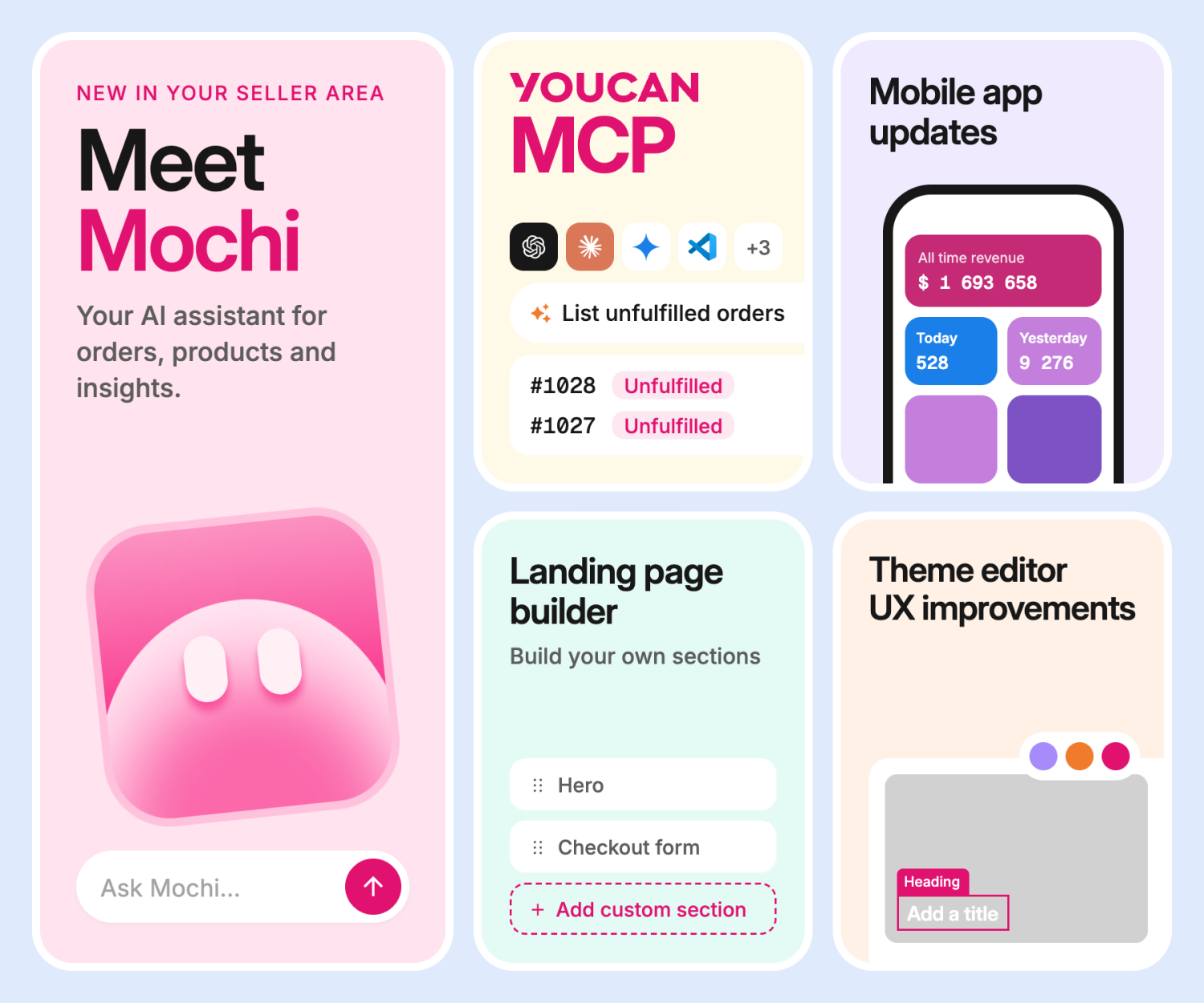 Meet the new AI ways to work with your YouCan store
There’s always something to do when you’re running an online store: new orders to check, products to update, customers to answer, promotions to prepare…
That’s why we’re bringing you new ways to get more done with less back-and-forth.
From your new AI assistant Mochi, to connecting your YouCan store to AI assistants through MCP, plus Theme Editor & Page Builder updates, and improvements to the YouCan mobile app, there’s plenty to discover.
Let’s take a look!
Mochi, your daily AI assistant on your YouCan store
**Mochi** is your new AI assistant, designed to help you manage your store through a simple conversation.
Need to find an order? Update a product? Create a coupon? Prepare a landing page? Ask Mochi!
Instead of jumping between different sections of your dashboard, you’ll be able to tell Mochi what you need and get things with a click.
Here’s what Mochi can help you with:
•**Get help when you need it**
Ask questions about YouCan, adding products, preparing your sales, managing orders, and more. •**Manage your store through chat**
Ask Mochi to find information or request changes to your products, orders, coupons, or pages. You’ll review and approve every change before it’s applied, so you stay in control. •**Create content for your store**
Prepare and preview landing pages, or generate promotional images from your product photos. Generated images are saved directly to your store’s image library. •**Pick up where you left off**
Your conversations are saved, so you can come back to them even after closing the chat or reloading the page. •**Stay in control of your changes**
Some creations and modifications can be undone within 24 hours. Deletions cannot be undone. •**Use your AI credits**
Your available AI credits are checked before each request. Completed responses and generated images are charged according to their respective rates, with a daily limit per store. If a response fails, you’ll only be charged for images that were actually delivered.We can’t wait for you to give it a try.
[Discover Mochi](https://seller-area.youcan.shop/admin?utm_source=newsletter&utm_medium=email&utm_campaign=newsletteroctober2026-en) Connect your YouCan store to your favorite AI assistant
Already using an AI assistant?
With **MCP**, you can connect your YouCan store to compatible AI assistants such as ChatGPT, Claude, and Gemini and simply tell them what you want to do.
Once the store owner has authorized the connection, your AI assistant can help with everyday tasks such as:
•**Products & stock:** Create or update products, prices, variants, and stock quantities. •**Orders:** Search and filter orders, update their status, and manage shipping. •**Customers:** Find customer profiles and update their information and addresses. •**Promotions & content:** Create or update coupons, categories, menus, upsells, and reviews. •**Pages & images:** Create or update pages, preview them, and use images from your store. •**Shipping:** Manage shipping zones and delivery rates.No need to figure out where to make each change. Just describe what you want to do, and your AI assistant can work directly with your store.
[Connect my store](https://youcan.shop/en/blog/posts/mcp?utm_source=newsletter&utm_medium=email&utm_campaign=newsletteroctober2026-en) Your Theme Editor just got better
We’ve made the Theme Editor easier and more intuitive to use, so you can find what you need faster and make changes without getting lost along the way.
Here’s what’s new:
•**Find things faster:** New search bars help you quickly find sections, settings, and apps. •**Navigate more easily:** Switch between your Structure Tree, Theme Settings, and Apps directly from the header. •**Edit more easily:** Reorder sections, apply multiple actions, and jump straight to a section in the code editor. •**Keep everything organized:** Global sections like your Header, Template, and Footer are now clearly separated. •**Discover more apps:** Browse apps more easily and jump straight to the App Marketplace. •**Enjoy a cleaner layout:** Settings now open in their own sidebar for a more focused editing experience.Small changes, but they make a big difference when you’re building and updating your store.
[Discover the Theme Editor updates](https://seller-area.youcan.shop/admin/themes/?utm_source=newsletter&utm_medium=email&utm_campaign=newsletteroctober2026-en) A Whole New Page Building Experience
We’ve rebuilt the Page Builder from the ground up to make creating and customizing pages smoother, easier, and more enjoyable, with an experience that’s now in line with our revamped Theme Editor.
And there’s more! Mochi is now part of the experience and can help you generate and customize pages. We’ve already created a few pages with Mochi, and the results look significantly better than what we typically see from sellers. Give it a try and see for yourself!
[Explore the New Page Builder](https://seller-area.youcan.shop/admin/pages?utm_source=newsletter&utm_medium=email&utm_campaign=newsletteroctober2026-en) Edit your Images freely
You can now edit your images directly inside YouCan, without switching between tools or leaving your Seller Area. Whether you’re working on a landing page, a product page, or in the Theme Editor, simply hover over any image in your Gallery and click **Edit** to open **Studio**, your new full-screen image editor.
Crop and resize images, rotate or flip them, draw on them, update their names and alt text, or set a focal point. You can also preview and download your edits, undo or redo changes, save them over the original image, or keep the original and save an edited copy instead.
And there’s more! The Gallery now lets you sort images by date, name, or size, switch between grid and list views, and preview images more easily.
Manage more of your store from your phone
Your business doesn’t stop when you leave your computer, and neither should your ability to manage it.
That’s why we’re preparing a series of improvements to the YouCan mobile app, making it easier to keep an eye on your store and take care of everyday tasks wherever you are.
•**Orders:** Find what you need faster with filters by order status, and access key information and actions directly from each order. •**Products:** Spot out-of-stock products more easily and quickly find the prices and stock quantities you need to update. •**Customers:** Find customer details and contact them directly by phone, WhatsApp, or email. •**Dashboard:** Get a clearer view of your sales and latest orders at a glance. •**Store management:** Move more easily through categories, coupons, pages, and upsells with simpler forms and navigation. •**Multiple stores:** Managing more than one store? Switching between them will be easier too.More flexibility, more visibility, and fewer reasons to reach for your laptop.
Explore the new mobile experience
[](https://apps.apple.com/fr/app/youcan-shop/id1485859147?utm_source=newsletter&utm_medium=email&utm_campaign=newsletteroctober2026-en) [](https://play.google.com/store/apps/details?id=youcan.shop&hl=fr&utm_source=newsletter&utm_medium=email&utm_campaign=newsletteroctober2026-en) Ready to put AI to work?
AI can already do much more than generate ideas.
You can use it to manage products, work with orders, update your store, create content, and get help when you need it.
So go ahead and explore what’s possible. Connect your store to an AI assistant, try out the new tools, and see which tasks you can hand over to AI.
**Your store is yours to run. AI is here to help you run it.**
You can also read this newsletter in the [web version](https://youcan.shop/en/blog/posts/newsletteroctober-2026?utm_source=newsletter&utm_medium=email&utm_campaign=newsletteroctober2026-en).
Happy selling!
The YouCan Team

YouCan · 651 N Broad St Ste 205, Middletown, DE 19709
You received this email as a YouCan merchant.
[Manage email preferences](https://mailcoach.youcancorp.com/manage-preferences/bd375add-8eeb-4106-b9af-5283cf011b81/f0047cec-05ad-476b-9432-285cbd96a0ca?utm_source=newsletter&utm_medium=email&utm_campaign=newsletteroctober2026-en) · [Unsubscribe](https://mailcoach.youcancorp.com/unsubscribe/bd375add-8eeb-4106-b9af-5283cf011b81/f0047cec-05ad-476b-9432-285cbd96a0ca?utm_source=newsletter&utm_medium=email&utm_campaign=newsletteroctober2026-en)- Accession
- nse/youcan/2026-10-21/4652
- From
- YouCan · email@email.youcan.shop
- Sent
- 21 October 2026 · 04:00 UTC